

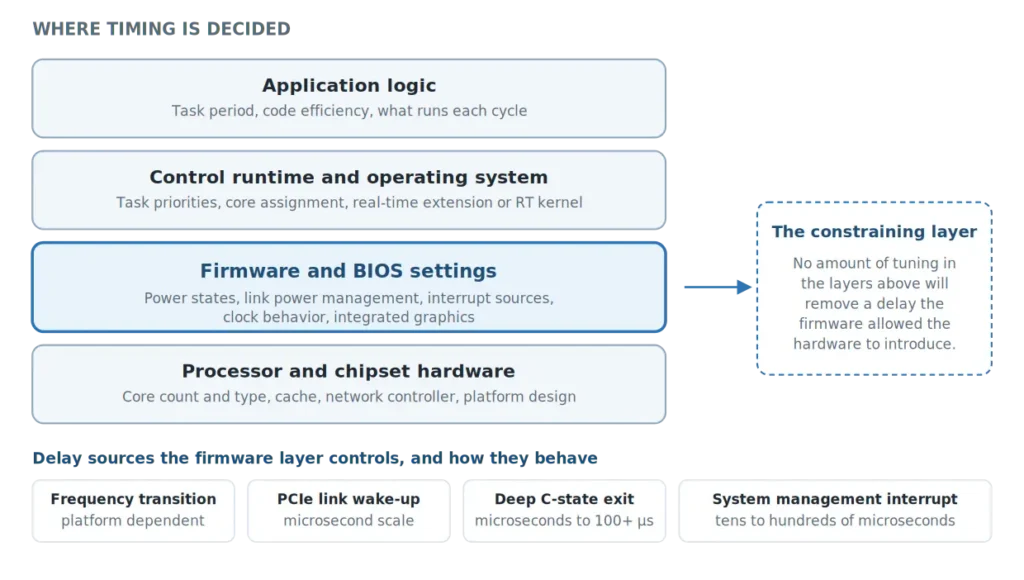
Figure 1. Timing is decided at four layers. Firmware constrains everything above it.
Why a fast PC is not automatically a deterministic PC
Average performance and worst-case latency are different measurements, and general-purpose platforms are engineered hard for the first one.
A processor that drops its clock when idle and ramps when work arrives delivers excellent average throughput and low power. It can also mean that when a control task fires after a quiet period, the core is not at the speed you assumed, and the transition costs time. A PCIe link that sleeps between packets saves milliwatts, and makes the first I/O transaction after an idle gap waits for the link to wake. A deep sleep state saves more power still, and takes longer to exit. None of this is a defect. It is optimizing for a goal a machine controller does not have.
Several of these share a useful characteristic: they are transition costs. A continuously busy system rarely pays them, because nothing gets the chance to go idle. A system that alternates between waiting and working, which is exactly what a cyclic control task does, meets them repeatedly. That is one reason a controller can look clean on a bench under steady load and behave differently on a real machine.
Other items work by a different mechanism, which is worth keeping straight. Shared logical cores create contention rather than a transition. System management interrupts arrive asynchronously and are not a power state at all. Grouping everything under one explanation is where a lot of BIOS advice goes wrong.
Which industrial PC BIOS settings affect real-time latency?
BIOS menus vary between vendors and platform generations, and not every setting exists on every board. As acontis notes in its own PC and BIOS optimization guidance, there are no real standards here, and a given option may or may not be present. So it is more useful to understand the groups than to memorize a list.
Two things are worth pulling out of that table.
The first is that the interrupt group is the hardest to diagnose. A system management interrupt runs in a mode below the operating system, so no task priority, no real-time kernel and no core isolation protects you from it. Software scheduling cannot preempt an SMI; the underlying source has to be removed, avoided, or addressed at the platform or firmware level.
That does not mean every SMI should be eliminated. Intel is explicit that SMI handlers perform real platform functions, including thermal and power management, and removing them indiscriminately is not safe. The useful work is identifying which sources are periodic, unnecessary for the deployment, and safe to disable on that specific platform. A watchdog, for example, is a machine reliability mechanism and should not be switched off casually just because it appears in a firmware menu.
The second is that the graphics group is routinely overlooked. On a headless controller it is easy to assume the integrated GPU is idle and irrelevant. If it is enabled, it is neither: it shares the package power budget and the memory controller, and its power management runs whether or not a display is connected.
Which BIOS settings are usually already handled on automation PCs?
This is the question worth asking before changing anything, and the answer depends on what kind of computer you started with.
On a general-purpose PC or consumer mini-PC, firmware is usually optimized for power, thermals and broad compatibility rather than deterministic timing. Many dynamic power and performance features are therefore enabled by default.
Industrial computers built specifically for automation are more likely to arrive with the large and well-known items already addressed, since those are the settings every real-time guide names first and every automation vendor is asked about repeatedly. How much has been done varies by manufacturer and by product, and it is a fair question to put to a supplier rather than an assumption to make.
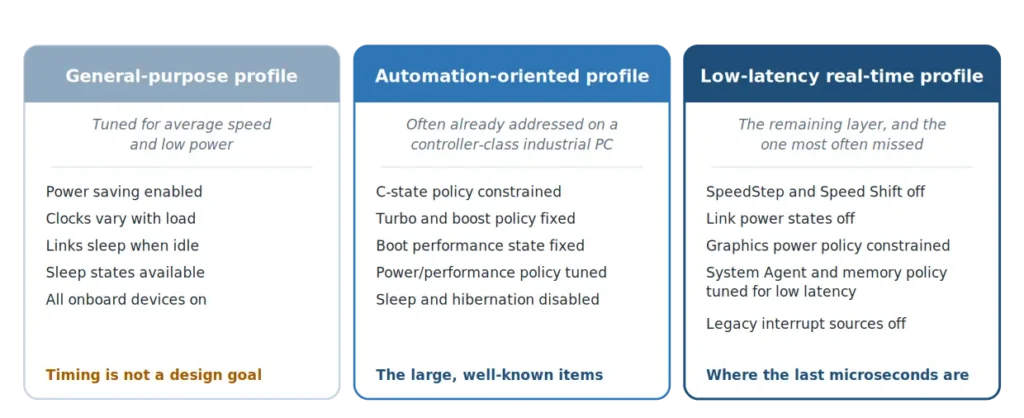
Figure 2. Three configuration profiles, and what each one typically leaves for the next.
What tends to remain is the less obvious layer: frequency and voltage transition policy, link power management across PCIe, DMI and SATA, integrated graphics power management, System Agent and memory policy, hybrid core handling, and legacy interrupt sources. Individually each is small. Together they are often the difference between a platform that usually holds its cycle and one that holds it consistently. So the practical sequence is to find out what the platform already does, change the remainder deliberately, and validate the result on the target hardware.
What BIOS settings does CODESYS recommend for real-time control?
The clearest way to see that this is engineering rather than folklore is to read what the runtime vendors themselves specify.
CODESYS publishes hardware recommendations for its real-time runtime on Windows that ask users to disable hyper-threading or SMT, virtualization technology, efficiency cores on Intel processors from the twelfth generation onward, energy-saving options that lead to frequency changes, and legacy USB or other BIOS functions that produce periodic SMIs. On the Windows side they add disabling Fast Startup and Hibernate, and keeping network adapters used by the runtime out of sleep mode. Their Linux guidance adds a real-time kernel, a fixed CPU frequency, a performance governor and a dedicated physical network adapter for the fieldbus. Our own step-by-step guide to configuring an EtherCAT controller with CODESYS on an IPC covers the runtime side of the same setup.
The same class of firmware behavior turns up elsewhere. Other PC-based real-time platforms publish comparable guidance around ASPM, C States, SpeedStep, hyper-threading and legacy USB, and Microsoft’s current Windows IoT soft real-time guidance likewise treats CPU idle states, core isolation and interrupt placement as part of the platform configuration required for predictable timing. The runtime differs; the problem does not.
This is also why the boundary matters. The runtime vendor decides task priorities and scheduling. The platform decides whether the hardware underneath will honor them.
How do you test whether BIOS changes improved real-time performance?
This is where most of the advice available online stops, and it is the part that matters. Changing settings is easy. Demonstrating that they did something is not.
An idle baseline is useful, but it is not enough. Measure before and after each change, as CODESYS itself recommends, and then measure again under load. On a quiet system many of these settings show little or no difference, because nothing is asking a PCIe link to wake, nothing is asking the GPU to ramp, and the CPU is not making interesting decisions. Concluding from an idle test that the settings do not matter is the classic mistake.
Load it the way a machine loads it, in bursts. Continuous load hides transition costs entirely. Useful disturbance alternates: network traffic with idle gaps between bursts, storage activity with pauses, graphics activity if the graphics settings are in scope, and a varying workload inside the control task itself so the core is allowed to go quiet and then has to come back.
Push contention onto shared resources. If the real-time task is pinned to an isolated core, generic CPU load on other cores may not reach it. What does reach it is contention for what every core shares: package power, cache, the memory controller and the PCIe root complex. Design the load to touch those.
Report maximum latency and deadline misses first. For deterministic control these are the primary numbers. A single missed deadline can stop a machine or damage a part, and no favorable distribution compensates for it. High-percentile statistics are a valuable complement, because they show the shape of the distribution and whether a maximum is an isolated event or the visible edge of a broader problem. They are not a substitute. On a 1 kHz task, a 99.9th percentile figure still leaves roughly one cycle per second outside it.
Always state how long the test ran. A maximum observed over thirty seconds and a maximum observed over eight hours are not comparable figures, and rare events are exactly the ones being hunted.
Measure execution time as well as jitter. If a core is running below its expected frequency, an identical block of computation simply takes longer, and that spread is often a clearer signal than the jitter figure alone.
For a sense of scale, CODESYS states that on a normal system the jitter reported by its Windows real-time runtime fluctuates by around plus or minus 100 microseconds. That is a baseline observation for that runtime on typical hardware rather than a specification, and the number on any particular machine has to be measured.
A note on Intel Time Coordinated Computing
Recent Intel platforms add a further layer, Intel Time Coordinated Computing. Intel TCC Mode provides a preset of latency-oriented firmware settings. On supported platforms, the broader Intel real-time toolset can also use cache allocation to isolate real-time workloads from best-effort activity, which goes beyond anything in the table above. Intel’s work here is also a good reason not to treat “disable everything” as a rule: it has published low-latency configurations in which SpeedStep, Speed Shift and Turbo remain enabled under a more sophisticated frequency management strategy.
The caveat is availability. Intel TCC is supported on specific processor SKUs, typically the industrial and embedded variants of a family rather than every part in it, and earlier generations do not have it at all. Plenty of capable, currently shipping industrial processors do not include it, and the board vendor still has to expose and validate the corresponding firmware support. Check the specific part in Intel Product Specifications rather than assuming a family-wide capability.
Why a validated firmware profile is worth more than a commissioning checklist
The argument for a platform arriving already configured is not about saving an engineer twenty minutes in a setup menu.
On platforms where custom setup state depends on battery-backed RTC and CMOS storage, depletion of that battery, or a CMOS reset, can return setup parameters to their defaults. The machine still boots and the application still runs, but power management features that were carefully disabled can quietly return. Timing drifts, an intermittent fault appears, and nobody connects it to a battery, because nothing announced the change. How this behaves varies with the platform and with how setup values and firmware defaults are implemented, so it is worth confirming with the manufacturer rather than assuming.
The broader point holds regardless. If the real-time configuration is part of the platform’s validated firmware defaults, a reset returns the controller to the intended profile instead of requiring a technician to reconstruct it in the field, correctly, years after anyone documented why each value was chosen. That is a small point that becomes an expensive one on a machine with a fifteen-year service life, and it is a reasonable question to put to any supplier: is this configuration part of your validated default profile, or is it something I am expected to apply and then remember to reapply?
Key takeaways
- Average speed and worst-case timing are different goals. General-purpose firmware defaults optimize the first; real-time control depends on the second.
- The settings that matter fall into groups: CPU speed changes, sleep states, core topology, hybrid core types, virtualization, link power management, integrated graphics, memory and System Agent policy, and interrupt sources.
- The mechanisms differ. Some are transition costs, some are resource contention, and some are asynchronous interference. Treating them all the same way is where bad advice comes from.
- System management interrupts are the hardest to diagnose because no software priority preempts them, but they should be addressed selectively rather than eliminated wholesale.
- The correct profile depends on the processor generation, the runtime and the workload, and it has to be validated with a bursty, shared-resource load. Report maximum latency and deadline misses first, with high-percentile statistics as a complement.
- A configuration held as a validated firmware default survives a reset. A configuration applied by hand has to be reapplied by hand.
Frequently asked questions
Which BIOS settings improve real-time performance?
Nine groups: CPU frequency and voltage management, CPU sleep states, core topology including hyper-threading and hybrid P-core and E-core handling, virtualization where the runtime requires it, link power management across PCIe, DMI and SATA, integrated graphics power management, System Agent and memory policy, and legacy interrupt and SMI sources. Exact names and availability vary by platform, and the appropriate values depend on the runtime and the processor generation.
Does disabling C States really reduce jitter?
It removes one specific and well-documented contributor: the time a core takes to exit a sleep state before it can execute, and on deeper states the cost of repopulating cache. Whether it is the dominant contributor on a given machine depends on what else is enabled and on the workload, so it should be measured rather than assumed.
Should I disable every power management feature?
Not necessarily. Disabling frequency scaling and deep sleep states is a conservative starting point and what most runtime vendors currently recommend, but Intel has published low-latency configurations on newer platforms where frequency management remains enabled under a more sophisticated strategy. Validate the profile on the target hardware.
Why does the integrated GPU matter on a headless controller?
Because when it is enabled it shares the package power budget, cache and memory bandwidth with the control task, and its power management runs whether or not a display is connected. Constraining the graphics power and frequency policy removes a competitor for resources the control task needs.
Do I still need a real-time operating system or extension if the BIOS is configured correctly?
Yes. They solve different problems. Firmware configuration reduces hardware-level delays that software scheduling cannot preempt. A real-time kernel or extension decides which task runs when. Neither substitutes for the other.
How much difference does BIOS configuration actually make?
It depends on the starting point. On a general-purpose PC the difference can be substantial, because nothing is configured for timing. On an industrial PC already shipped with an automation-oriented profile, the remaining improvement is smaller and appears mainly in the worst case rather than the average. Measure it on the target hardware under realistic load.
Is Intel Time Coordinated Computing available on every industrial PC?
No. It is supported on selected processor SKUs, generally the industrial and embedded variants of recent generations, and it requires the board vendor to expose and validate the corresponding firmware support. Earlier generations do not have it at all. Check the specific processor in Intel Product Specifications rather than the product family.
Explore Industrial PCs for Real-Time Control
Real-time behavior is a property of the whole platform: processor selection, board design, network controller choice, and the firmware configuration that ties them together.