

Industrial IPC Platforms for Ignition SCADA Architectures
Inductive Automation’s Ignition platform is software-centric and hardware-agnostic by design. System integrators and OEMs choose the industrial computing platform that best fits their plant floor, then deploy Ignition on top. That openness is precisely where NODKA industrial IPC platforms can be deployed throughout an Ignition architecture, from edge data collection and gateway servers to operator workstations.
From an architecture perspective, Ignition 8.3 can be deployed on NODKA IPC platforms to build a fully open SCADA stack on industrial-grade hardware, without sourcing the architecture from four different vendors.
This article introduces the NODKA IPC portfolio and explores how different product families can be applied within Ignition architectures, across the Edge Node, Ignition Gateway, Perspective Session client, and Engineering Workstation roles in a typical SCADA deployment. A companion step-by-step guide walks through one such integration end-to-end.
Why NODKA IPC + Ignition
Ignition’s unlimited-tag, server-based licensing model encourages integrators to deploy multiple roles (historian, Gateway, Edge node, Perspective Session) on hardware sized to the job, rather than on a single oversized PC. NODKA’s IPC families align with that model and address several friction points integrators encounter with traditional proprietary automation platforms:
- Continuous industrial operation: fanless, wide-temperature, and 24/7-rated platforms designed to run uninterrupted on the plant floor, in control cabinets, and on machinery.
- Modular by design: Automation PCs, iPAC IPC controllers, and EtherCAT I/O modules combine to fit applications from compact edge nodes to centralized SCADA Gateways. Engineers can swap a PC module without replacing the screen, or upgrade the screen without re-wiring the cabinet.
- Predictable lead times: North-America-stocked product reduces the supply-chain volatility integrators have seen with brand-name PLCs and HMIs over the past several years.
- OEM/ODM flexibility: bezels, I/O, branding, and form factors can be customized for machine builders that want Ignition Edge IIoT embedded in their own product.
- Standard OS support: NODKA IPC platforms support standard Windows and Linux operating systems commonly used in industrial automation and SCADA deployments.
The result is an architecture where computing resources can scale with application requirements, and where an integrator can standardize on one vendor across an Ignition architecture, simplifying spares, training, and lifecycle support.
Applying NODKA IPC Platforms within Ignition Architectures
An Ignition deployment typically involves four functional roles. Each can be served by a different NODKA IPC product family, depending on the application.
Edge Node: NODKA iPAC Series
At the edge of the network, the iPAC IPC controller is a Programmable Automation Controller (PAC) that runs CODESYS Control alongside an EtherCAT master and exposes its variables through an embedded OPC UA server. In this role, the iPAC executes real-time logic against connected EtherCAT I/O modules, then publishes the resulting tags so an OPC UA client, such as the Ignition Gateway, can read and write across the network.
For Ignition integrators, this means an iPAC can serve as both a PLC and an OPC UA server in one box, without requiring proprietary driver stacks or licensing tied to a specific software platform. The same iPAC that drives servos and digital I/O over EtherCAT can publish OPC UA tags that may be integrated into Ignition architectures.
The platform may also be suitable for evaluation with Ignition Edge IIoT where integrators want to combine local data buffering, Sparkplug-over-MQTT, and OPC UA server functionality at the edge of the network.
Ignition Gateway: NODKA NP-6116
The NODKA NP-6116 is a fanless, control-cabinet-mountable Automation PC sized for workloads such as an Ignition Gateway. In this role, it can aggregate OPC UA data from one or more edge nodes, host Perspective and Vision projects, and serve Designer connections to the engineering team, all on a platform designed for 24/7 cabinet operation.
Because the Gateway sits at the heart of the SCADA system, the computing platform needs to be highly reliable. The NP-6116’s fanless design, wide operating temperature range, and rugged industrial chassis are engineered for exactly that class of workload.
Its multiple Ethernet ports make it straightforward to separate the OPC UA field network from the operations network, which can support network segmentation strategies commonly used in industrial environments. With Ignition 8.3’s new Gateway Deployment Modes, integrators also have the option to run multiple Gateway configurations from the same physical platform; for example, separating development, staging, and production resources.
Perspective Session Client: NODKA Panel PCs, HMIs, and Industrial Touch Monitors
On the plant floor, Ignition Perspective Sessions need to run somewhere the operator can see and touch. Perspective Workstation, Ignition’s dedicated client runtime for desktop deployments, can be configured on NODKA’s visualization-class IPCs in either Windowed Mode or full-screen Kiosk Mode:
- Multi-Touch Panel PCs: Panel PCs such as the TPC6000-C123W can be configured to run Perspective Workstation in Kiosk Mode for cell-level operator stations.
- Stainless Waterproof Panel PCs: IP69K-rated panel PCs offer the same form factor for food, beverage, and pharmaceutical washdown environments.
- Arm-Mounted Panel PCs and Button-Integrated Panel PCs: These systems place a visualization client on the side of a machine, close to where operators work.
- Industrial Touch Monitors: Touch monitors paired with an iPAC over HDMI can collapse the Edge Node and Perspective Session client into a single device, providing a smaller footprint for compact machines and OEM deployments.
Ignition 8.3 also adds Deep Link and File Association support, which can allow a Perspective Session on a Panel PC to be launched from a URL without opening the Workstation launcher. This is useful for kiosk deployments and one-click HMI startup at boot.
Engineering Workstation: Any NODKA IPC Running Ignition Designer
Ignition Designer is where integrators build the project. While the Designer Launcher is light enough to run on any modern Windows or Linux machine, many integrators choose a Tower / Wallmount Industrial PC or Fanless IPC as a dedicated, permanent engineering workstation inside the control cabinet, connecting to the NP-6116 Gateway over Ethernet for in-place project edits.
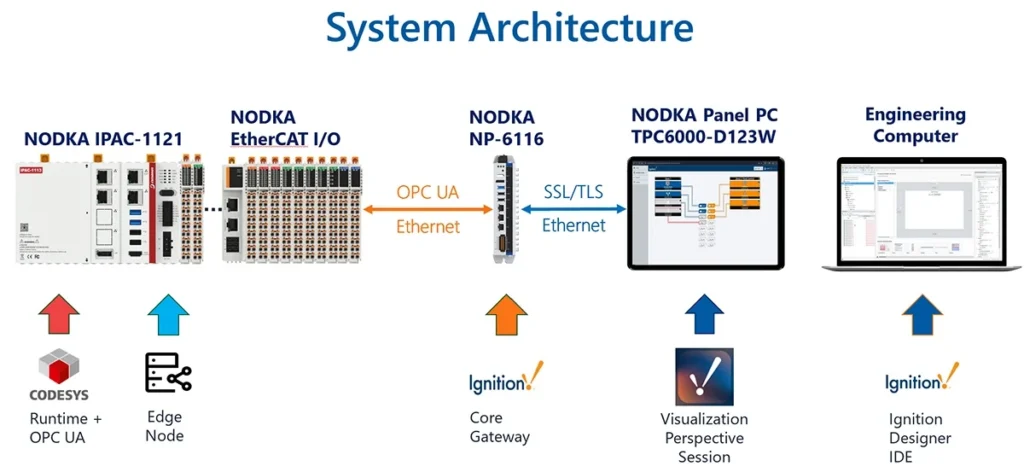
A typical NODKA + Ignition evaluation architecture could look like this:
Physical I/O — EtherCAT ➞ NODKA iPAC (CODESYS + OPC UA Server)
                           |
                           | OPC UA over Ethernet
                           ▼
               NODKA NP-6116 (Ignition Gateway)
                           |
                           | SSL / TLS over Ethernet
                           ▼
        NODKA Panel PC (Perspective Workstation, Kiosk Mode)
                           ▲
                           | Designer Launcher connection
                           |
              Engineering IPC (Ignition Designer)
From a single-cell demo, the same iPAC, NP-6116, and Panel PC pattern can be extended outward, with additional iPAC edge nodes connecting into the Gateway over OPC UA, and additional Panel PCs subscribing to the same Perspective project.
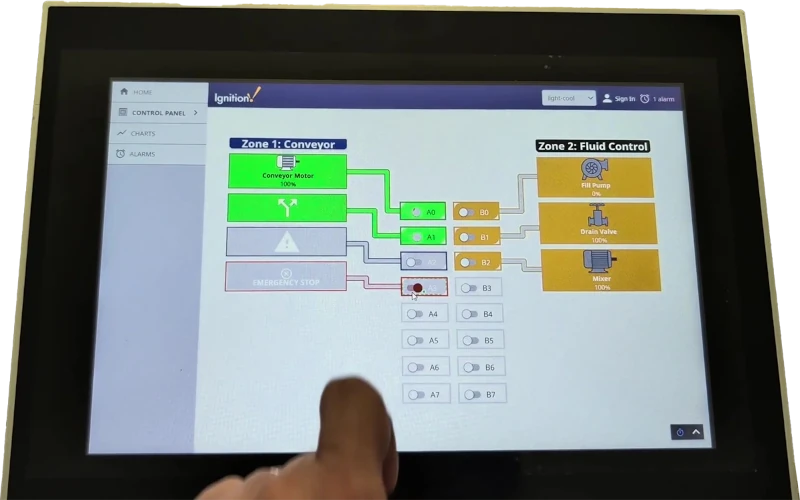
NODKA Panel PC running Perspective Workstation in Kiosk Mode — Conveyor and Fluid Control zones live
Industries and Applications
The NODKA IPC + Ignition combination is a strong fit for applications where an integrator wants open, standards-based control on automation-grade computing platforms:
- Discrete manufacturing and packaging: Conveyor and motion zones driven by EtherCAT, visualized in Perspective.
- Food, beverage, and pharmaceutical: Stainless waterproof Panel PCs running Perspective in washdown areas.
- Energy and water/wastewater: Distributed iPAC edge nodes (optionally with Ignition Edge IIoT) feeding a centralized NP-6116 Gateway.
- Machine builders (OEMs): Compact iPAC + Industrial Touch Monitor combinations bundled into the machine.
- Robotics and multi-axis positioning: iPAC as a real-time motion controller, Ignition as the supervisory layer.
From IPC to Working System
Choosing the right NODKA IPC platform is the foundation. The next step is bringing the system online: exposing tags from an iPAC, connecting them to an Ignition Gateway over secure OPC UA, building a Perspective view, and deploying it to a Panel PC in Kiosk Mode.
Our companion article, Step-by-Step Guide: Connecting a NODKA iPAC to Ignition Perspective via OPC UA, walks through one such integration in six clear steps, from CODESYS Symbol Configuration to a kiosk-mode Perspective Session driving physical LEDs on a NODKA EtherCAT I/O module.
Considering an Ignition project on NODKA IPC platforms?
Reach out to our team at [email protected] to discuss your application, request evaluation units, or explore OEM customization options. NODKA’s automation-grade IPCs, Panel PCs, HMIs, and EtherCAT I/O modules are well suited for evaluation and deployment with Ignition 8.3, backed by 25+ years of ODM/OEM experience supporting industrial automation worldwide.